Pular para o conteúdoSkip to content

Orquestra for Windows

Modernize legacy systems with context, validation and traceability.

Investigate legacy code, implement changes and compare results in one environment connected to your enterprise services.

YOU'RE IN CHARGEChamber orchestra

Every part matters.
Together, they make something bigger.

TimpaniFluteHornViolinsCellos

Tap the instruments to build your own ensemble.

Sound starts only when you choose to listen.

Recordings: VSCO 2 CE · CC0

Two problems, one platform

Orquestra tackles two structural IT challenges

Problem 1

Legacy System Modernization

Modernization programs have to recover business rules and dependencies before they can transform a system. The work suffers from knowledge scattered across scripts, spreadsheets and chats: fragmented execution, lost artifacts and unaudited decisions.

The Orquestra solution

Assisted discovery and documentation, Oracle dump extraction with no Oracle install, and migration planning. Every step preserves its artifacts to guide implementation and validation.

Problem 2

Fragmentation in New Development

Teams starting new systems repeat the same work on every project: undocumented stack choices, ad hoc scaffolding and architecture alignment — all before writing a single line of business logic.

The Orquestra solution

An Application Factory that generates blueprints with stack, architecture, institutional standards and an execution plan. Specialized agents with observability support development. Every project starts with explicit architecture choices and work steps.

How it works

From investigation to delivery, backed by evidence.

Three stages of the work, connected in one environment.

  1. 01

    Understand before you change

    Explore the legacy system and check dependencies on the impact map. Every link can be verified against its source files.

    Impact map and code references

  2. 02

    Implement and review

    Work on the project and request an independent, risk-based review. Check the findings, the evidence and what still needs validation.

    Review with code excerpts and identified risks

  3. 03

    Compare and deliver

    Run the same scenarios on the legacy and modern systems. Examine the differences and keep inputs, outputs and results in one report.

    Per-scenario comparison and evidence package

See the functional comparator in the app
Functional comparatorDemo data
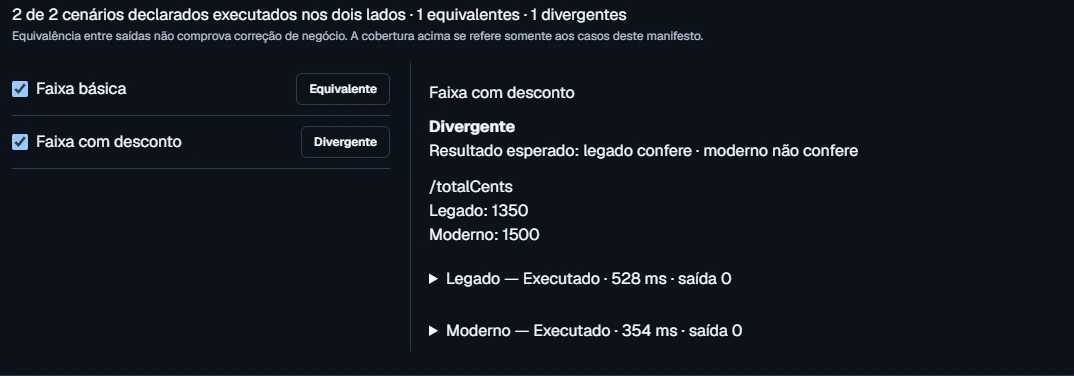
Orquestra comparator: two scenarios run, one matching and one diverging. In the discount tier, the legacy system returns 1,350 and the modern one returns 1,500.
Spot the difference before you ship.Same inputs in both systems, per-scenario differences and an exportable report. App screenshot with a test example.Enlarge screenshot
Explore the full toolset and environment management

Migration

Discovery, documentation, database planning, extraction, analysis and application prep, with artifacts at every step.

Application Factory

Blueprints with stack, architecture, institutional standards, auth, deployment and execution plan. React, Vue, Node, .NET and more.

AI Agents

Sessions with persistent context, tool use, SSE streaming and a built-in terminal. Every decision tracked.

Technical Review

Review across tracks: code, consistency, design, security, testing and DevOps.

UX/UI

Design system builder with 50+ styles, color palettes, typography and component previews.

Testing

Test strategy, execution with coverage, stabilization and per-module scoping.

CI/CD

Pipeline configuration, validation and rollout for GitHub Actions, Azure DevOps, GitLab and Jenkins.

Code

Repository editor and browser with syntax highlighting, per-file diffs and tree navigation.

Frontend Modernization

UI transformation: scope, visual language, layout and redesign with guided choices.

Git Governance

sync → start → exec → validate → commit → push. TFS/Azure DevOps integration via WIQL.

Offline Oracle Extractor

Reads classic Oracle dumps (exp) with no Oracle installed. JSON manifest + validated CSVs per table.

Local-First

Files, impact map and functional comparison stay on the workstation. AI and collaboration features rely on the configured services.

Admin Panel

Manage projects, runs, access and enterprise service settings.

Dashboard

Operational radar with KPIs, health and events

Portfolio

Project board by stage with full intake

Roadmap

Executive planning for 2026–2032 with milestones

Timing

Telemetry for pipelines, runs and agents

AI

Governance of LLM models and providers

Users

Access control, sessions and roles

Audit

Unified trail by user, project and category

Settings

API, auth, persistence and capabilities

Case studies

Where Orquestra is already at work

Snapshots of work on legacy systems and new projects. Each case shows the scope of the work presented.

SISCARPE

Extraction and blueprint

Data extraction from an Oracle system, with per-table CSVs and a blueprint to guide the modern application.

See deliverables for SISCARPE
  • Oracle dump extraction without installing Oracle
  • Per-table CSVs and an application blueprint
  • Extraction artifacts ready for review

Feira e Mercados

MVP prep

An MVP for managing open-air street markets and municipal markets, set up with a project structure and institutional standards.

See deliverables for Feira e Mercados
  • Initial project structure
  • Institutional standards built into the setup
  • Documentation generated alongside the code

Participe+

Development

A civic participation platform. The Factory brings a defined stack, development agents and governance over Work Items.

See deliverables for Participe+
  • Predefined architecture blueprints
  • Azure DevOps integration
  • Agents supporting development

Infração

Discovery

Violation management running on a mainframe. Automated discovery, assisted documentation and a migration roadmap.

See deliverables for Infração
  • Automated legacy discovery
  • AI docs-assist for specifications
  • Structured migration roadmap

CENTS

Planning

A legacy financial control system. Mapped schema, a modern database plan and collection scripts for incremental migration.

See deliverables for CENTS
  • Legacy schema mapped and documented
  • PostgreSQL database plan generated
  • Automated extraction scripts

PDI (HR)

POC

An Individual Development Plan (PDI) for HR. A POC built with the Application Factory to demo the workflow to the business team.

See deliverables for PDI (HR)
  • POC to evaluate the workflow
  • Full stack defined by the Factory
  • Demo for the business team

Who it's for

Three roles, one platform

Built for the key roles in any enterprise software modernization or acceleration program.

Platform Engineer

Legacy Modernization

Leads mainframe, COBOL, Oracle Forms and IMS migrations. Needs a traceable pipeline, safe data extraction and artifact governance at every step.

  • 13-step pipeline: intake → production
  • Offline Oracle extractor (no Oracle install)
  • Full traceability of artifacts and runs
  • Native TFS / Azure DevOps integration

Tech Lead / Architect

Development Acceleration

Standardizes stack, architecture and best practices across projects. Starts new systems with standards already in place.

  • Application Factory with blueprints
  • PRODAM institutional standards built in
  • Agents with observability and context
  • From zero to a configured repo in minutes

Program Manager

Executive View

Needs a consolidated view of the modernization portfolio: status by system, comparisons across runs and reports backed by hard data.

  • Materialized portfolio with snapshots
  • Project board by stage
  • Run history and comparisons
  • Export to executive-ready formats

What's new across the ecosystem

What you can use today.

Updated .

Available

Orquestra · Windows 1.3.9

Compare legacy and modern

Scenarios with identical inputs, field-level differences and evidence export.

Available

Atlas · Windows 0.1.28 and Web

Explore the organization

Hexagon org chart, navigation by unit and access to metric history.

In progress

Multi Orquestra

Coordinate workstreams

Persistent campaigns have shipped. Integrating campaigns with the enterprise runtime is still in progress.

Getting started with Orquestra

The app runs on Windows. Files, the impact map and functional comparison are processed on the workstation; comparison adapters can reach the systems configured in the project. AI, authentication and collaboration use the connected enterprise services. Request a demo to learn about access and installation requirements.

Talk to the team

Ready to orchestrate your modernization?

Talk with our team and see how Orquestra can help transform your portfolio of legacy systems and new projects.

This opens your email app. Tell us which project or need you'd like to explore.